
L&D training calendar for ILT, deadlines & credentials

View scheduled ILT sessions, learner deadlines, instructor commitments, and credential dates in day, week, month, or agenda views.

16 seconds of ILT & virtual training: real app screens, fictional sample company.

How Trainery Calendar works, step by step

Calendar integration options can bring training events into the tools participants already use.

Trainery Calendar covers learning and training operations in one place, from ILT sessions to credential dates.

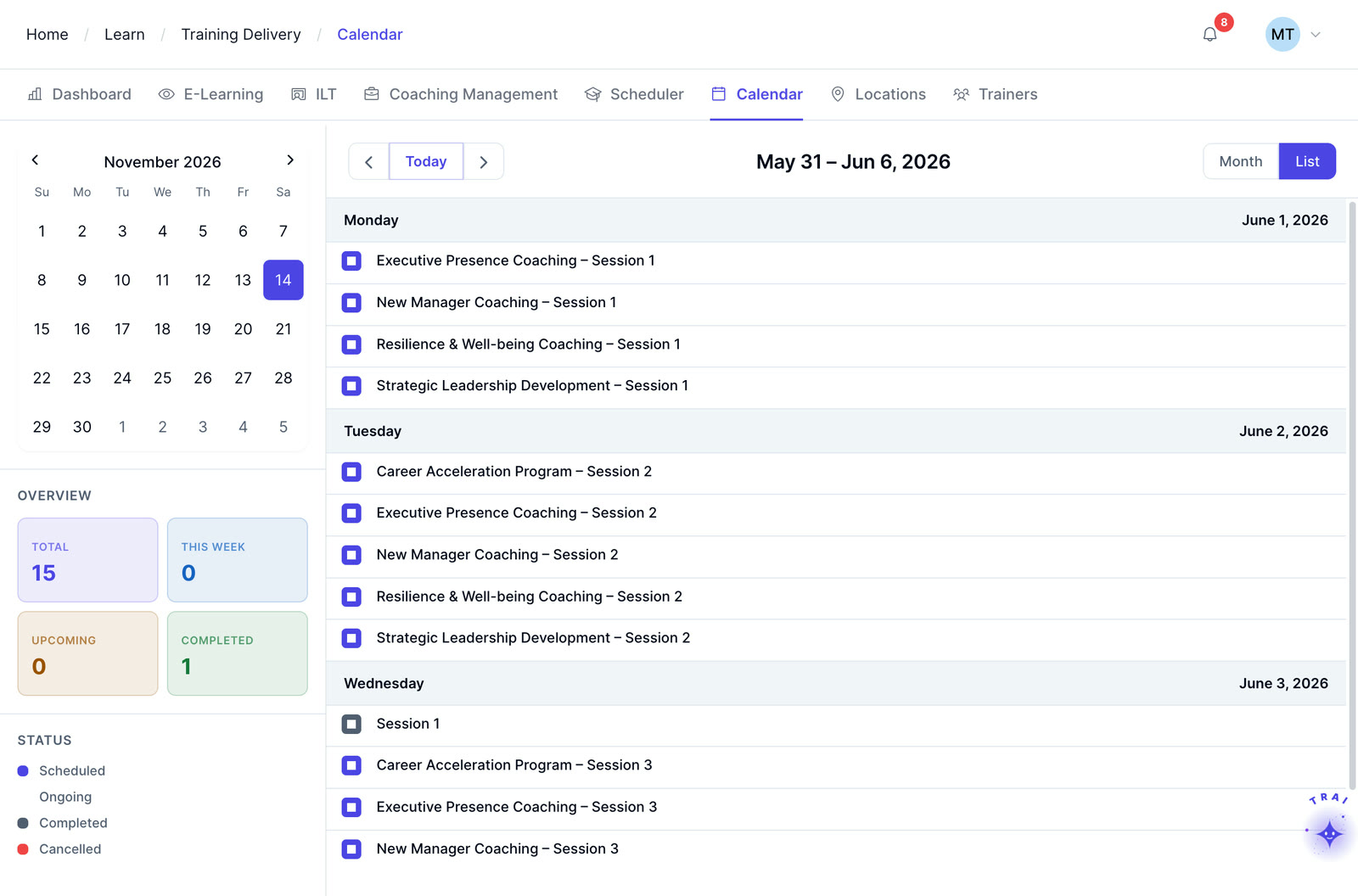
A week of instructor-led sessions in the Trainery calendar list view
  1. Step 1

    Bring training dates into one calendar view

    Calendar views can bring together scheduled sessions, learning deadlines, credential dates, and other configured training commitments so learners, managers, and L&D teams can plan from a shared view.

  2. Step 2

    Scoped to each user’s role

    Learners, managers, and L&D administrators can use role-appropriate calendar views based on the access and reporting configuration established for their organization.

  3. Step 3

    Connect training events to existing calendar tools

    Calendar integration options can connect training events with Microsoft Outlook and Google Calendar workflows. Confirm the supported sync behavior, update handling, and implementation requirements for your environment during solution scoping.

Train beyond your employees

ILT and virtual training in TraineryLMS can support customer, partner, and other external training programs with scheduling, instructor management, cost tracking, and recurring-program administration.

  • External event scheduling & registration management
  • Instructor & venue management for external programs
  • Recurring program and cohort management
  • Seminar, conference & onsite event administration
Explore extended enterprise training
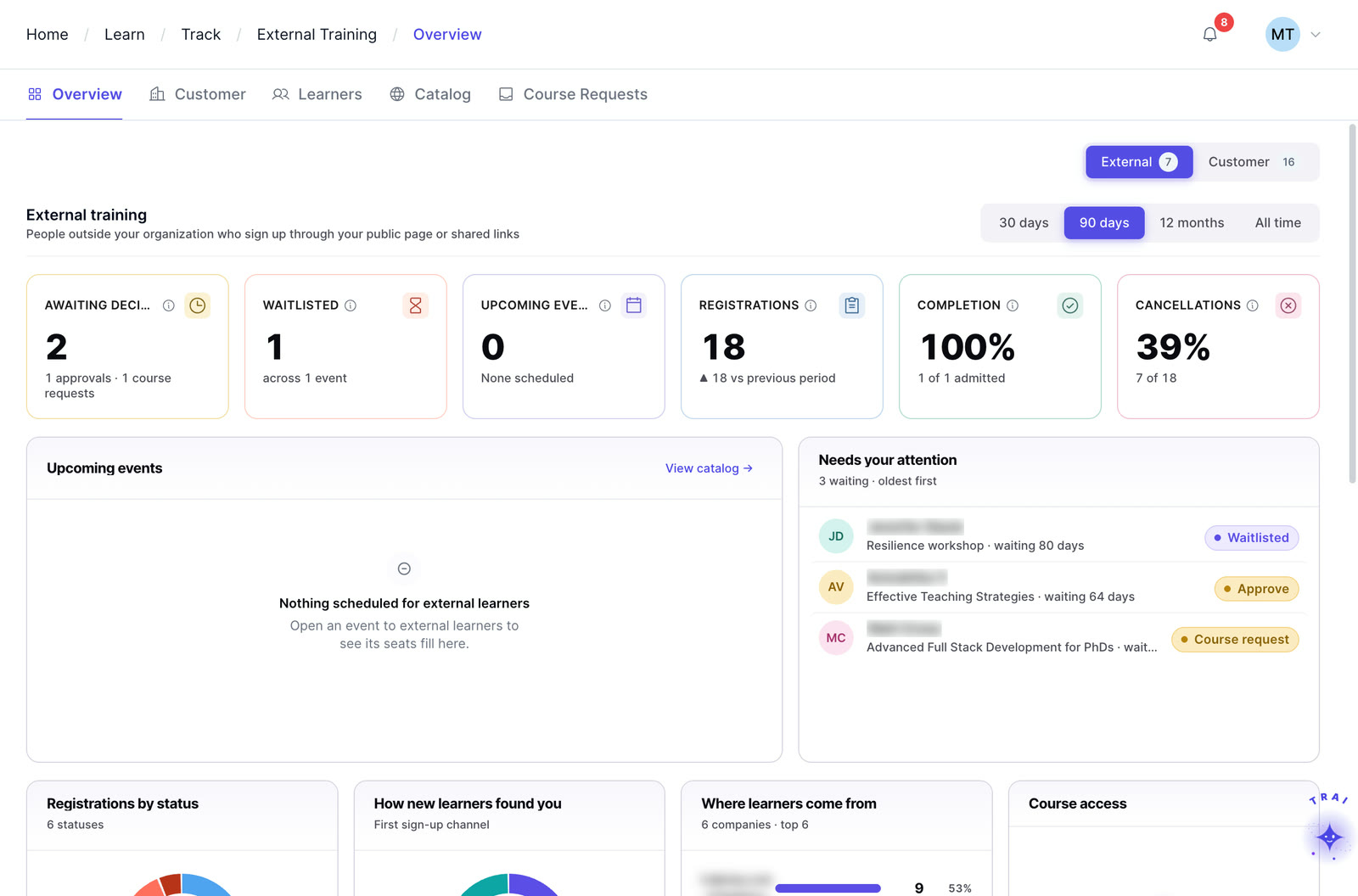
Extended enterprise in Trainery: external registrations, waitlists, completions and cancellations

Core features

Each role gets its own view, and each view can show sessions, due dates and credential expirations together.

Multiple view formats

Switch between day, week, month, and agenda views depending on the planning horizon. A training coordinator planning next quarter’s schedule uses the month view. A learner checking this week’s commitments uses the day or week view.
16 seconds of TraineryOPS: real app screens, fictional sample company.

Manager team view

Managers see what is on their team’s training plate at any time, including upcoming sessions, overdue assignments, and certification deadlines across all direct reports, in a single filtered calendar view.

Personalized learner view

Learners see only what is relevant to them: their enrolled sessions, assignment due dates, and certification deadlines. The personal view removes noise and helps learners plan their training around their other work commitments.

Admin program view

L&D administrators see the full program at a glance, every scheduled session, instructor commitment, and program milestone across the organization, with filtering by location, team, module, and date range.

Outlook and Google Calendar sync

Calendar integration options can place training events into the calendar tools participants already use. Confirm supported Outlook and Google Calendar behavior for your configuration during implementation.

Deadline and expiration visibility

Course due dates and credential expiration dates can be shown alongside scheduled sessions, helping learners and managers review upcoming training commitments in context.

Four capabilities. One platform.

TraineryLMS brings course delivery, training management, coaching and a content marketplace into one integrated platform.

LMS (learning management system)

TraineryLMS focuses on the delivery and tracking of digital learning experiences directly to the learner.

  • Delivers and tracks online courses
  • SCORM 1.2, SCORM 2004, xAPI & AICC support
  • Learner-facing: self-paced & blended learning
  • Tracks completions, scores, certifications

Best for: Digital course delivery at scale

Training management

ILT and virtual training in TraineryLMS optimizes the back-office operations, logistics, and financial management of training programs.

  • Plans and manages training programs
  • Schedules ILT sessions, instructors, venues
  • Admin-facing: operations & logistics
  • Tracks costs, attendance, and training operations data

Best for: Structured training operations

Coaching

Coaching in TraineryLMS gives managers and L&D teams a structured system for coaching conversations, goals and session tracking.

  • One-on-one and group coaching
  • Goals, milestones and session tracking
  • Program reporting for L&D teams

Best for: Structured manager coaching

Content marketplace

TraineryXchange adds ready-to-use courses across compliance, safety, leadership, onboarding and technical skills.

  • 10,000+ ready-to-use courses
  • Library courses sit beside your own in the catalog
  • Access depends on your Trainery agreement

Best for: Ready-made course content

  • User experienceLearners find online courses and live sessions in one place, while admins plan sessions, instructors and venues in the same system.
  • Data & analyticsLearning progress and assessment results sit beside attendance, scheduling and training costs, so reports draw on one set of records.
  • SchedulingRooms, instructors and live sessions are scheduled in the same platform that gives learners access to online courses.

Learning management system

The core learning engine. Centralized course delivery with role-based dashboards, SCORM/xAPI content support, and configurable HRIS integration options.

TraineryLMSILT & virtual trainingCoachingCredentialsTraineryXchange
  • Trainery connects learning delivery and training operations so calendar planning can sit alongside the workflows that create those commitments.
  • Trainery supports learning and training workflows across courses, ILT and virtual training, coaching, credentials, reporting, and related L&D operations.
  • Managers and L&D teams can use connected Trainery modules to move from planned learning activity to scheduled training and follow-up.
  • Coordinate training schedules, instructors, venues, and learner commitments
  • Review upcoming sessions, deadlines, and program milestones in calendar views
  • Use role-appropriate views to support learners, managers, instructors, and L&D teams
Training operationsManager & learner viewsCalendar integrationsDeadlines & credentials
Book a demo

Use cases by role

How learners, managers, administrators and coordinators plan around the same training calendar.

  • Learner: planning training commitments around project work without logging into two systemsAll enrolled training sessions and assignment due dates appear on the learner’s Google or Outlook calendar automatically. They see training commitments in context with everything else they have scheduled and can plan accordingly.Outcome: Training integrated into the learner’s existing workday
  • Manager: checking what training the team has coming up before approving a project deadline that falls next weekThe manager opens the team calendar view in Trainery and sees all sessions, deadlines, and certification expiration dates across their direct reports for the week in question. The scheduling conflict is visible before it becomes a problem.Outcome: Informed scheduling decisions before commitments are made
  • L&D administrator: getting a clear view of everything happening across the training program for a monthly leadership reportThe admin calendar view shows all scheduled sessions, program milestones, and certification deadlines across the organization for the reporting period. The administrator filters by module or location and exports the view for the report.Outcome: Program overview ready for leadership without manual compilation
  • Training coordinator: notifying 80 learners and 4 instructors of a session reschedule with immediate calendar updatesThe session is rescheduled in the Scheduler. Calendar entries update automatically for all enrolled participants and assigned instructors, and a notification triggers simultaneously. No one receives an outdated calendar entry.Outcome: 80-person reschedule communicated in one action
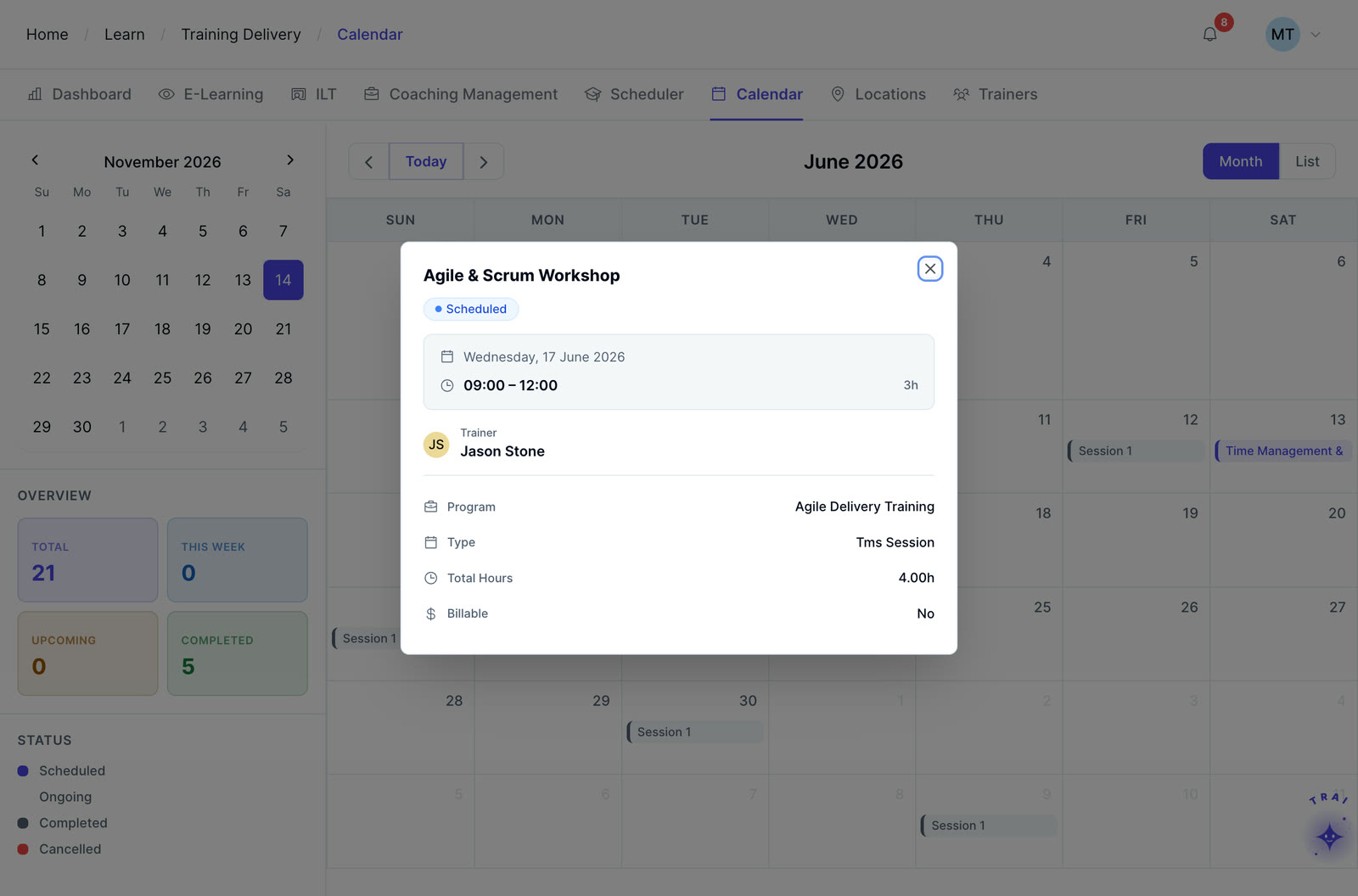
An instructor-led session opened from the Trainery calendar, with its trainer, time and hours

Training that lives outside the learner’s calendar is training that gets skipped

When training sessions, deadlines, and certification reminders sync to the tools learners already use every day, attendance rates improve, and completion rates follow. The Trainery Calendar makes training a visible part of the workday rather than a separate system learners have to remember to log into.

  • Role-scoped views for learners, managers, and administrators simultaneously
  • Certification expiration dates are visible alongside training sessions in the same view
  • Included with every Trainery subscription as part of TraineryOPS
  • Syncs to Outlook 365 and Google Calendar automatically on session publication
  • Day, week, month, and agenda formats available without switching platforms
Explore TraineryOPS
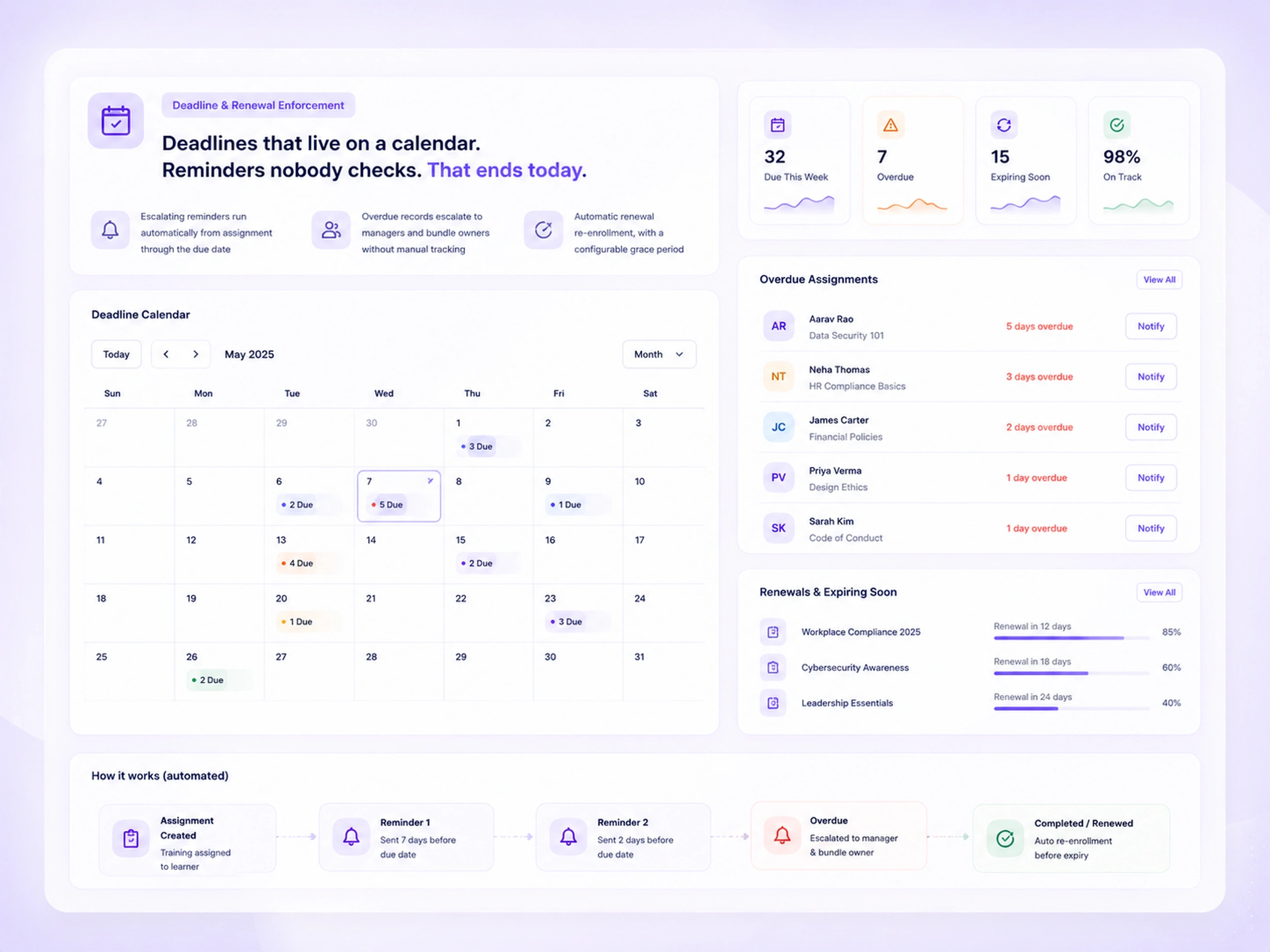
Deadline calendar for May 2025 showing training due dates by day, with panels for overdue assignments and upcoming renewals

Frequently asked questions

Does the Calendar sync automatically with Outlook and Google, or does it require manual setup?

The Calendar integrates with Outlook 365 and Google Calendar through a one-time configuration during implementation. Once connected, new sessions publish to learner and instructor calendars automatically without any manual action from administrators or participants.

Can managers see their entire team’s training schedule in one view?

Yes. Managers have a team calendar view that aggregates all upcoming sessions, assignment deadlines, and certification expiration dates for their direct reports into one filterable view. This gives managers the visibility to have proactive conversations about training before deadlines pass.

Is the Calendar included with every Trainery plan?

Yes. The Calendar is part of TraineryOPS, which is included with every Trainery subscription at no extra cost. There is no upgrade required to access the full calendar functionality.

Can the Calendar be filtered to show only a specific team, location, or program?

Yes. The Calendar supports filtering by team, department, location, module, session type, and date range. An L&D administrator managing a specific regional program can filter the calendar to show only sessions and deadlines relevant to that region without unrelated events cluttering the view.

What happens to calendar entries when a session is cancelled or rescheduled?

When a session is cancelled or rescheduled in Trainery, the calendar entry updates automatically for all enrolled participants and instructors. A notification is sent simultaneously, so participants are aware of the change without the administrator sending a separate communication.

Can learners add training sessions to their personal calendar directly from the learner portal?

Yes. Learners can add any enrolled session to their personal calendar from the learner portal with a single click. Where the calendar sync integration is configured, sessions are added automatically. Learners without the sync configured can also download an ICS file to add the event manually.

Do certification expiration dates from credential tracking appear on the Calendar?

Yes. Credential expiry dates tracked in TraineryLMS surface on the Calendar alongside scheduled training sessions. Learners see their upcoming renewal deadlines in the same view as their enrolled sessions, making it easier to plan renewal training before a certification lapses.

Ready to transform your training infrastructure?

Whether you need digital course delivery at scale or structured ILT operations, our team will help you find the right fit for your organization.