Automated training reminders & notifications

Configure training reminders, deadline alerts, certification notifications, instructor updates, and audience-based messages across Trainery workflows.

16 seconds of TraineryLMS: real app screens, fictional sample company.

How training notifications work

Use triggers, templates, and audience rules to reduce routine manual follow-up.

TraineryLMSILT & virtual trainingTraineryOPS
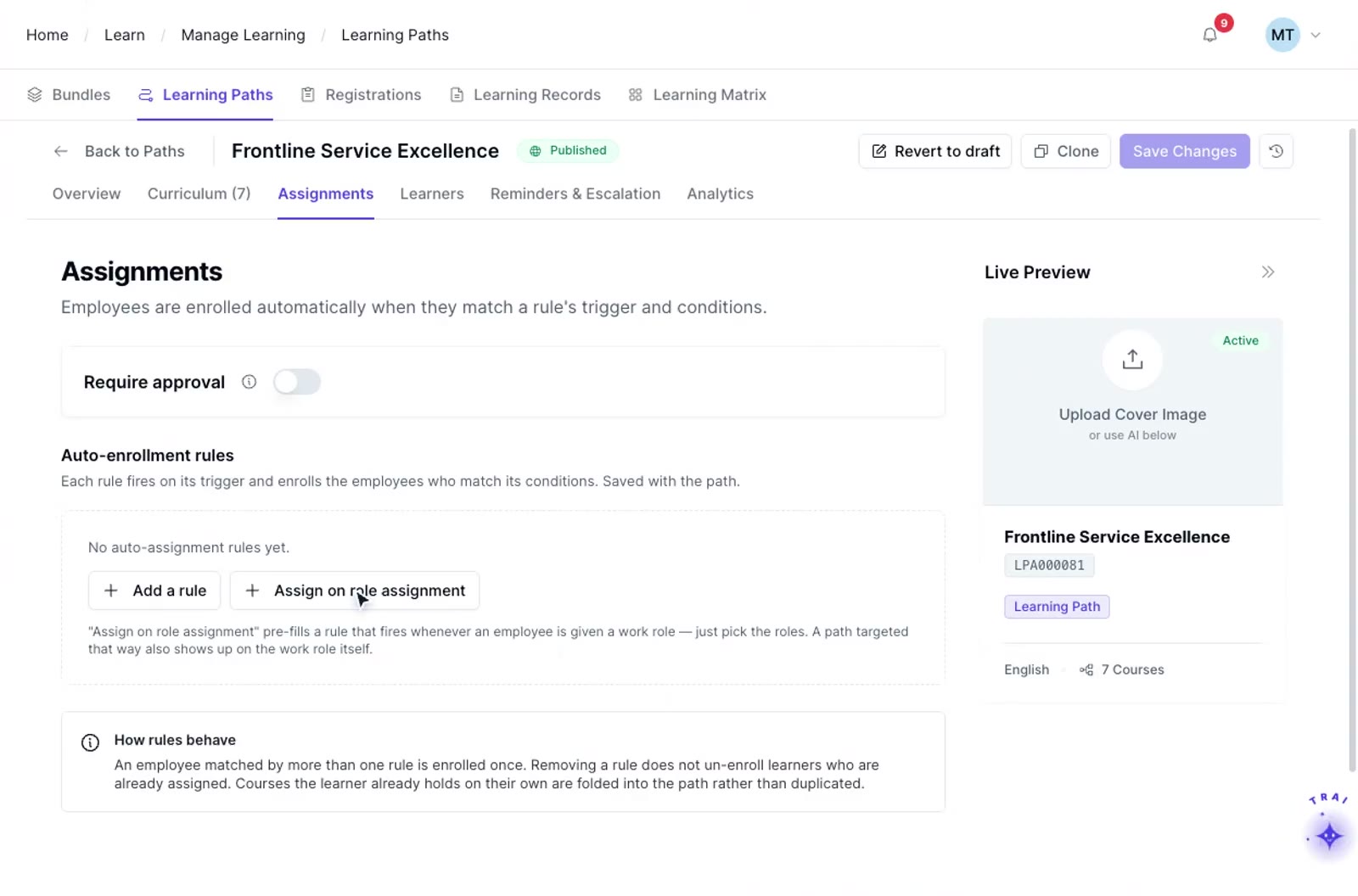
A TraineryLMS learning path’s assignments: auto-enrollment rules, with “Assign on role assignment”
  1. Step 1

    Define your triggers

    Set the conditions that trigger a notification: a due date approaching, a certification expiring, a deadline missed, a session confirmed, a course completed, or a learner going inactive. Each trigger is independent and configurable.

  2. Step 2

    Configure the template and audience

    Choose the message template, the delivery channel (email, in-app, or calendar), and the audience rule. Multiple audiences can receive different messages from the same trigger.

  3. Step 3

    Activate the rule

    Once configured, notification rules can send messages based on the triggers and audiences you define, reducing routine manual follow-up for recurring training workflows.

Train beyond your employees

ILT and virtual training in TraineryLMS supports customer training, partner learning, and external audiences with scheduling, instructor management, cost tracking, and recurring-program administration for training audiences outside your organization.

  • External event scheduling & registration management
  • Instructor & venue management for external programs
  • Recurring program automation & cohort management
  • Seminar, conference & onsite event administration
Explore extended enterprise training
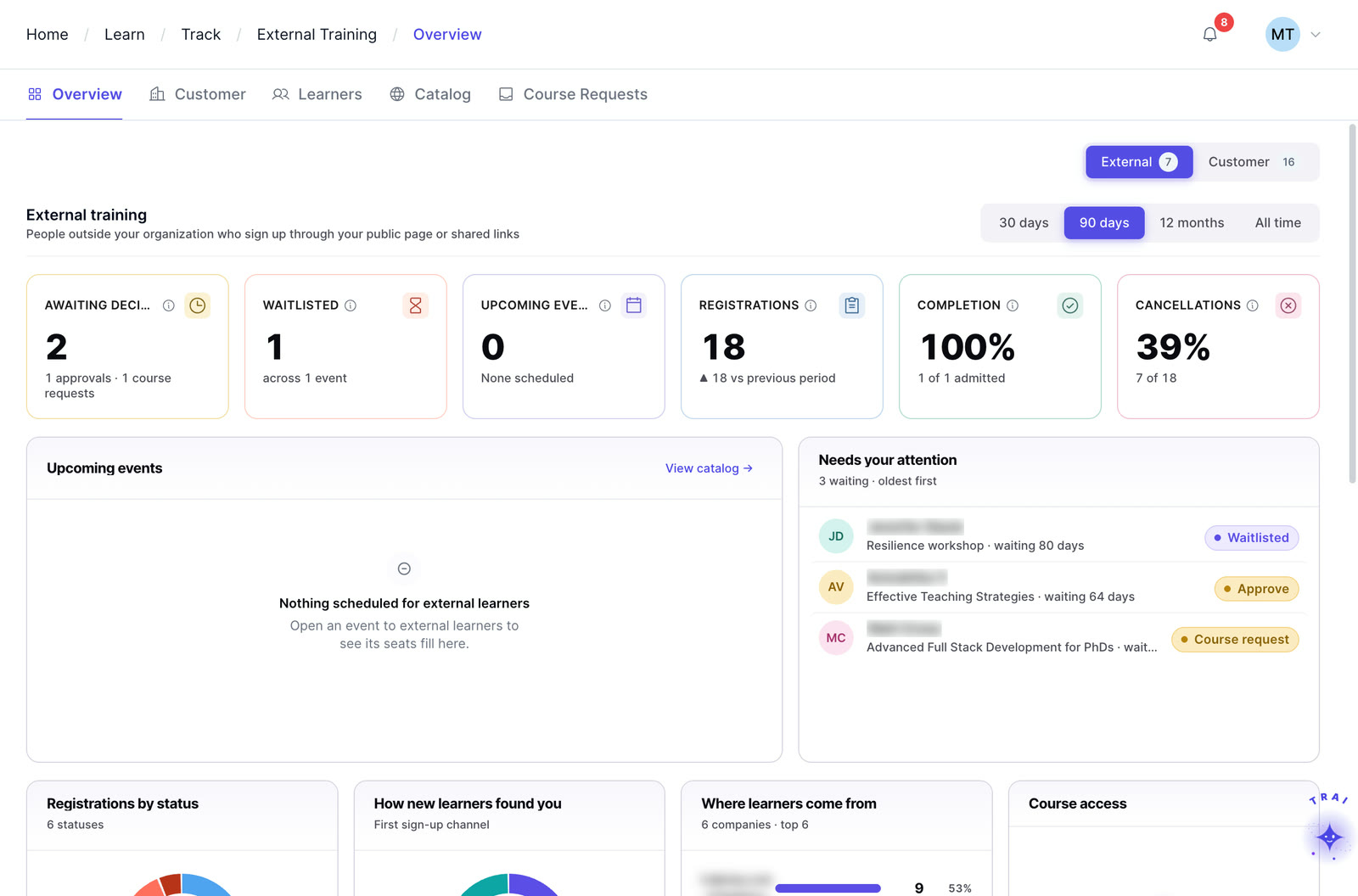
Extended enterprise in Trainery: external registrations, waitlists, completions and cancellations

Core features

Six notification types, each with its own trigger, template and audience rule.

When each trigger fires

Each trigger is independent and configurable. In this example, renewal alerts go out 90, 60 and 30 days before a certification expires, the learner gets reminders 14, 7 and 3 days before the deadline, and a missed-deadline escalation reaches the manager on the deadline day.

Annual compliance training Example workspace

Certification expiration alerts

Configure renewal reminders before a certification or credential expires. Reminder timing, recipients, and escalation rules should be set to match the organization’s credential and compliance workflow.

16 seconds of Compliance & credentials: real app screens, fictional sample company.

Due date reminders

Set reminder intervals before a course deadline and tailor the message by audience or stage. Reminder timing should match the training program’s actual due-date and escalation policy.

Missed deadline escalations

Configure escalation rules for missed training deadlines, including who should be notified and when. Exact timing and recipients can be aligned with the organization’s policy and grace-period requirements.

New content announcements

Notify targeted audiences when new courses, learning paths, or optional content become available. Audience rules ensure the announcement reaches only relevant learners, rather than the entire organization.

Learner inactivity alerts

Configure inactivity-based nudges for learners and optional alerts for managers when an assigned course or learning path has not progressed for a defined period.

Instructor confirmations

Use notification workflows for instructor session confirmations, schedule changes, materials, and roster updates. Confirm which communications and delivery channels are enabled in the implementation.

Four capabilities. One platform.

TraineryLMS brings course delivery, training management, coaching and a content marketplace into one integrated platform.

LMS (learning management system)

TraineryLMS focuses on the delivery and tracking of digital learning experiences directly to the learner.

  • Delivers and tracks online courses
  • SCORM 1.2, SCORM 2004, xAPI & AICC support
  • Learner-facing: self-paced & blended learning
  • Tracks completions, scores, certifications

Best for: Digital course delivery at scale

Training management

ILT and virtual training in TraineryLMS optimizes the back-office operations, logistics, and financial management of training programs.

  • Plans and manages training programs
  • Schedules ILT sessions, instructors, venues
  • Admin-facing: operations & logistics
  • Tracks costs, attendance, and training activity

Best for: Structured training operations

Coaching

Coaching in TraineryLMS gives managers and L&D teams a structured system for coaching conversations, goals and session tracking.

  • One-on-one and group coaching
  • Goals, milestones and session tracking
  • Program reporting for L&D teams

Best for: Structured manager coaching

Content marketplace

TraineryXchange adds ready-to-use courses across compliance, safety, leadership, onboarding and technical skills.

  • 10,000+ ready-to-use courses
  • Library courses sit beside your own in the catalog
  • Access depends on your Trainery agreement

Best for: Ready-made course content

  • User experienceLearners find online courses and live sessions in one place, while admins plan sessions, instructors and venues in the same system.
  • Data & analyticsLearning progress and assessment results sit beside attendance, scheduling and training costs, so reports draw on one set of records.
  • SchedulingRooms, instructors and live sessions are scheduled in the same platform that gives learners access to online courses.

Learning management system

The core learning engine. Centralized course delivery with role-based dashboards, SCORM/xAPI content support, and configurable HRIS integration options.

TraineryLMSILT & virtual trainingCoachingCredentialsTraineryXchange
  • Use notifications to keep learners, managers, instructors, and administrators informed about relevant training events and required follow-up.
  • Trainery supports learning and training workflows across courses, ILT and virtual training, coaching, credentials, reporting, and related L&D operations.
  • Audience-based messaging can support course assignments, session updates, credential reminders, and other configured learning workflows.
  • Target messages by learner, manager, instructor, administrator, or other configured audience
  • Use reusable message templates and configurable trigger rules for recurring training communications
Deadline remindersCredential alertsInstructor updatesLearner nudges
Book a demo

Use cases by role

How L&D, compliance, sales enablement and managers replace manual follow-up.

  • L&D team: ensuring 500 learners complete their annual compliance training without manual chasingConfigure reminders at 14, 7, and 3 days before the deadline with escalating urgency in each message. A missed-deadline escalation is sent to management on the deadline day. The L&D team monitors completion rates in the dashboard rather than spending the final week sending individual follow-ups.Outcome: Compliance deadline met without administrator chasing
  • Compliance officer: making sure no certification lapses across a team of 150 employees in a regulated roleRenewal alerts are configured to trigger at 90, 60, and 30 days before each certification expiration. Alerts go to the employee, their manager, and the compliance officer simultaneously, so nothing lapses without at least three warnings having been sent.Outcome: Zero undetected certification lapses
  • Sales enablement: communicating a new product training course to the sales team only, not the whole organizationConfigure a new content announcement with an audience rule targeting the sales department. Only sales team members receive the notification. Regional L&D managers receive a separate version with enrollment metrics. The rest of the organization is unaffected.Outcome: Targeted announcement with no unnecessary notifications for unaffected staff
  • Manager: re-engaging learners who stopped activity on a six-month development program after week twoInactivity alerts trigger when a learner has not engaged with their learning journey for a configurable number of days. The alert goes to the learner as a gentle nudge and to their manager as a visibility signal. Most learners re-engage after the first nudge.Outcome: Early re-engagement before it becomes a completion risk
Announcement: new product training Example workspace
Audience ruleDepartment is Sales
Sales team64
L&D managers6
Other staff0
  • Sales versionCourse announcement with an enroll linkSent
  • L&D manager versionIncludes enrollment metricsSent

Every hour spent sending reminders is an hour not spent improving programs

In most organizations, training coordinators spend significant time each week chasing learners, reminding managers, and following up on overdue completions. The Notification Engine eliminates that entirely. Configured once, it runs continuously and handles communication across every program without administrator intervention.

  • Fully configurable triggers, templates, and audience rules per notification type
  • Escalation rules ensure missed deadlines reach managers automatically
  • Zero manual follow-up required after initial configuration
  • Multi-channel delivery across email, in-app messages, and calendar invites
  • Inactivity alerts re-engage learners before they fall too far behind
Explore TraineryOPS
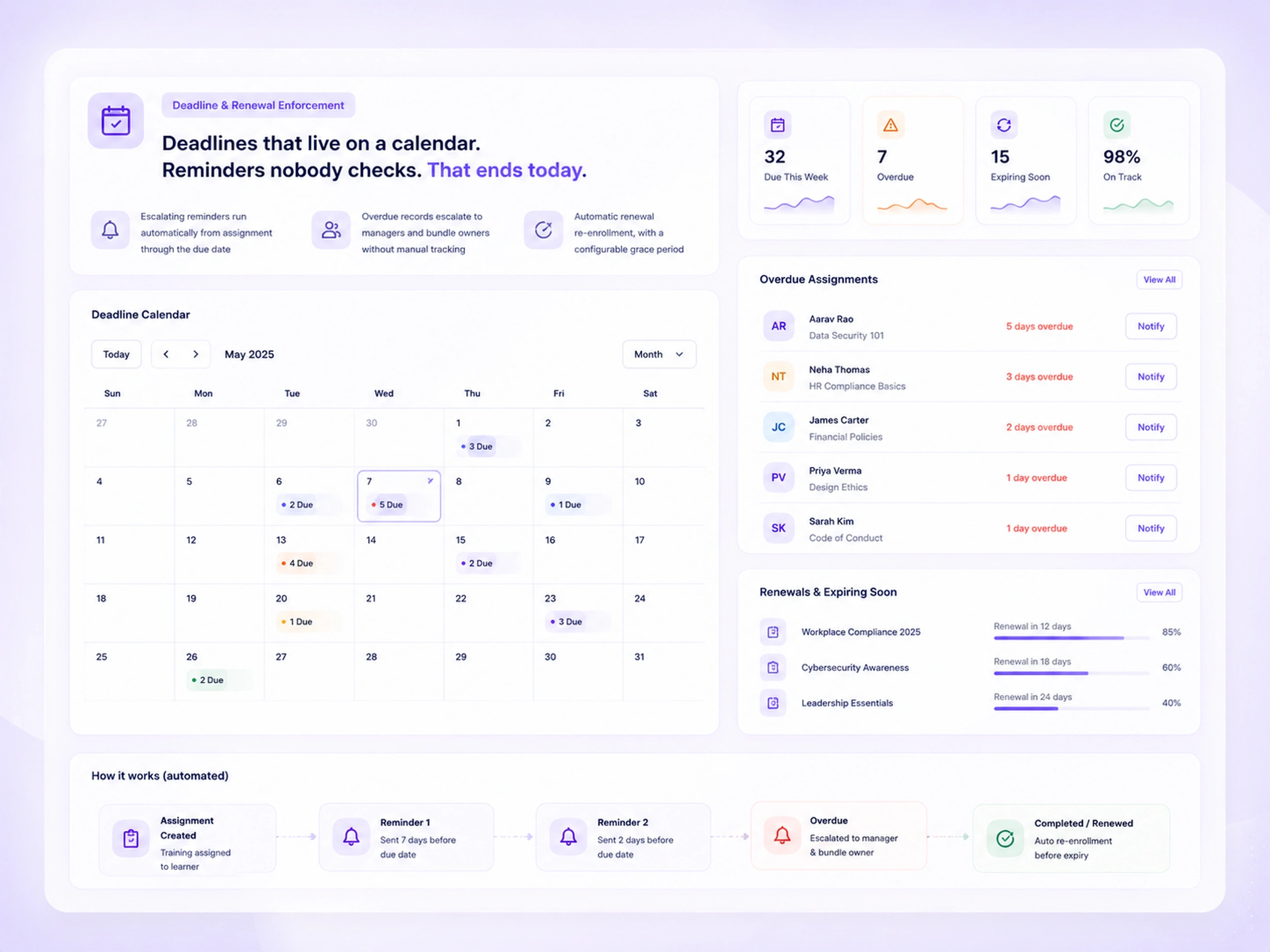
Deadline and renewal view: escalating reminders from assignment through the due date, overdue assignments with notify buttons, and an automated reminder flow from assignment to escalation

Frequently asked questions

Can notification templates be customized with our organization’s branding and language?

Yes. Every notification template is fully customizable: subject line, body content, sender name, branding, and tone. You can maintain different templates for different program types so a compliance reminder reads differently from a new content announcement.

Can different people receive different notifications from the same trigger?

Yes. A single trigger can generate different notifications for different audiences simultaneously. For example, a missed deadline trigger can send a gentle nudge to the learner and a more direct alert to their manager at the same time, each with its own message and template.

Can we turn off notifications for specific programs or audiences without affecting others?

Yes. Notification rules are configured at the program, course, or audience level independently. Turning off a reminder for one program does not affect notifications configured for other programs. Rules can be paused, modified, or deactivated individually without a system-wide change.

This is part of TraineryOPS, which is included with every Trainery subscription at no extra cost. There is no upgrade required to access the full notification functionality.

Does the Notification Engine work for external learners as well as employees?

Yes. For organizations using Trainery’s Extended Enterprise Training capability, the Notification Engine sends notifications to external learner portals for customers, partners, resellers, and association members. External learners receive enrollment confirmations, due-date reminders, and completion certificates the same way internal employees do.

Can notifications be sent through Slack or Microsoft Teams as well as email?

Yes. Trainery integrates with Slack and Microsoft Teams for notification delivery. Learners who prefer to receive training reminders in their communication tools rather than email can configure their notification preference accordingly. Enterprise clients can set organization-wide channel defaults.

Is there a log of all notifications sent so administrators can verify delivery?

Yes. The Notification Engine maintains a complete delivery log showing which notification was sent, to whom, at what time, through which channel, and whether it was opened where that data is available. This log is accessible to L&D admins for program management and to compliance teams for audit purposes.

How does the Notification Engine help improve course completion rates?

Completion rates improve when timely, relevant reminders reach learners, rather than a single enrollment notification and no follow-up. The Notification Engine ensures learners are reminded at strategic intervals, managers are alerted when direct reports fall behind, and inactivity is caught early enough to allow re-engagement before it becomes a missed deadline.

Ready to transform your training infrastructure?

Whether you need digital course delivery at scale or structured ILT operations, our team will help you find the right fit for your organization.