
Training document management software for learning records

DocuStor centralizes training certificates, signed acknowledgments, external credentials, expiring licenses, and supporting audit records in a searchable, permission-controlled repository.

DocuStor record: Luis Ortega Example workspace
Search recordsEmployee name, document type, date range or certification name
  • Forklift certificationExternal credential, expires in 28 daysRenewal alert
  • Completion certificate: OSHA Workplace Safety 2026Generated by Trainery on Nov 12Stored
  • Code of conduct acknowledgmentSigned, uploaded by HR admin on Mar 3Version 2
Who can see this recordLuis, his manager and the compliance team
Role-based

How training document management works

Records are captured, permissioned by role and found again by search when a review or audit needs them.

TraineryLMSTrAI
Records captured for Luis Ortega Example workspace
  • Completion certificateGenerated by TraineryStored
  • AcknowledgmentSigned in a configured workflowStored
  • Assessment recordGenerated by TraineryStored
  • External recordUploaded by an authorized userUploaded
Who can see Luis Ortega’s records Example workspace
  • HR managerRelevant team recordsView
  • Compliance teamCredential and certification recordsReview
  • Luis Ortega, learnerHis own filesAccess
Access controlsConfigured by role
Role-based
Search records Example workspace
Search byEmployee name, document type, date or certification name
  • Forklift certificationLuis Ortega, external credentialRenewal alert
  • Code of conduct acknowledgmentLuis Ortega, signed Mar 3Version 2
Ready for a review or auditNo manual file search
Ready
  1. Step 1

    Documents captured automatically

    Trainery-generated completion certificates, acknowledgments, and assessment records can be stored in DocuStor as part of configured workflows. External records can also be uploaded by authorized users. Confirm which record types are captured automatically in your implementation.

  2. Step 2

    Permissions applied by role

    Access controls can be configured by role. HR managers can view relevant team records, compliance teams can review credential and certification records, and learners can access their own files based on assigned permissions.

  3. Step 3

    Find records when needed

    Search by employee name, document type, date, or certification name to locate the record needed for reviews, audits, or internal follow-up without relying on manual file searches.

Train beyond your employees

ILT and virtual training in TraineryLMS supports customer training, partner learning, and external audiences with scheduling, instructor management, cost tracking, and recurring-program administration for training audiences outside your organization.

  • External event scheduling & registration management
  • Instructor & venue management for external programs
  • Recurring program automation & cohort management
  • Seminar, conference & onsite event administration
Explore extended enterprise training
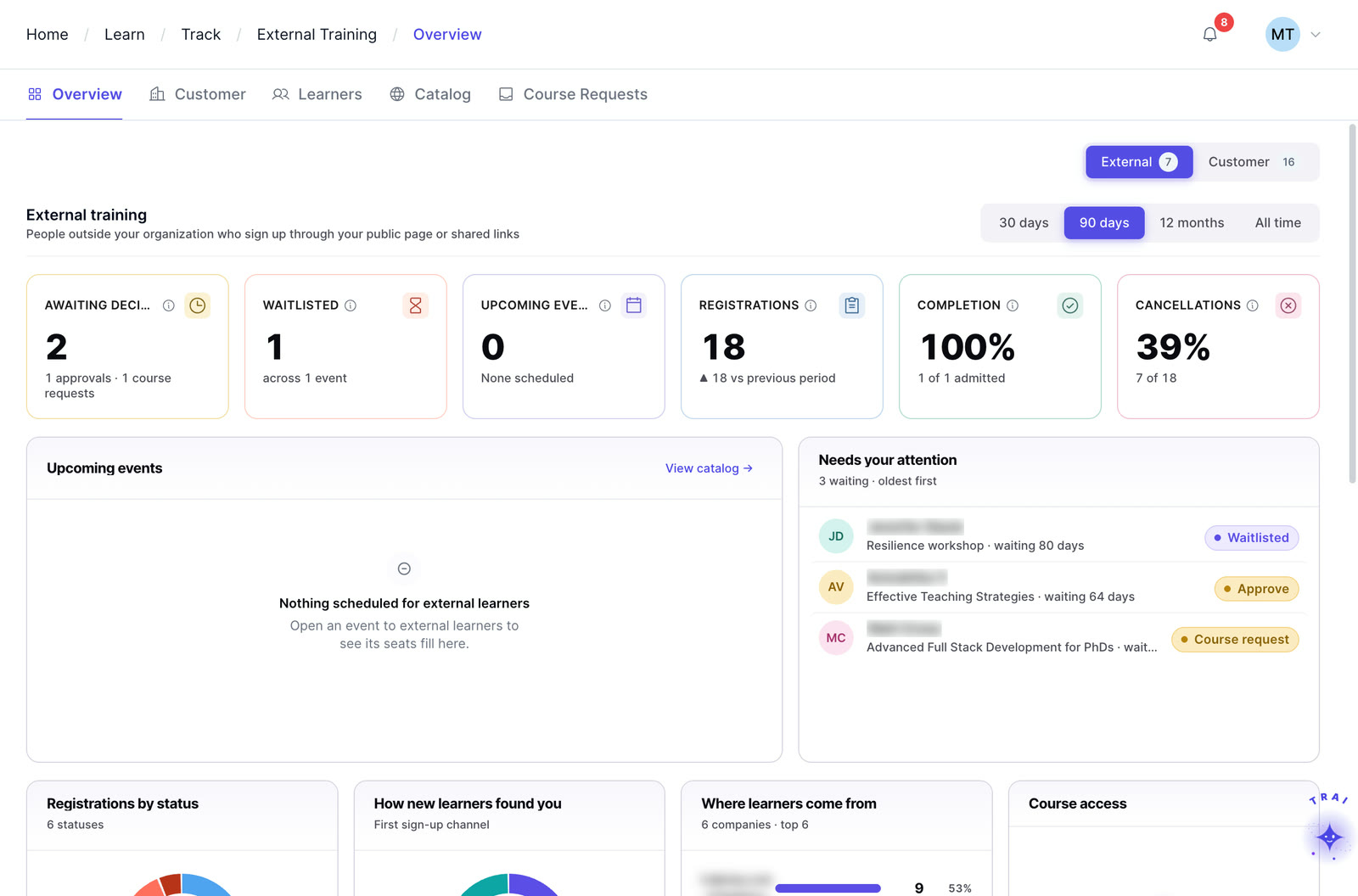
Extended enterprise in Trainery: external registrations, waitlists, completions and cancellations

Core features

Permissions, search, version history and renewal alerts for the training records you store.

Searchable repository

Search stored documents by employee name, document type, date range, or certification name to reduce manual file hunting and support faster record review.

Search DocuStor Example workspace
Certification: forkliftLocation: Plant 2Any date
  • Luis OrtegaForklift certification, expires in 28 daysRenewal alert
  • Ana RuizForklift certification, valid to Aug 2027Valid
  • Dev ShahForklift certification, renewal uploaded Oct 2Version 2
3 records foundShown according to your role permissions
Role-based
Permission-controlled access

Set access permissions per document type, employee record, or organizational unit. An HR manager sees their team’s documents, a compliance officer sees certification records across the organization, and learners see only their own files.

Version history

Version-history behavior should be confirmed for the record types and retention requirements in scope. During implementation, validate timestamps, uploader attribution, overwrite behavior, and historical-record access against the organization’s audit needs.

Renewal alerts for expiring documents

For documents with expiration dates, configurable renewal alerts can support follow-up before licenses, external certifications, or acknowledgments expire. Confirm reminder rules and escalation workflows during implementation.

Audit record retrieval

DocuStor can help teams organize and retrieve stored records for internal reviews and audits. Confirm access controls, export formats, retention, and evidence requirements for the specific audit workflow in scope.

Security & data protection controls

DocuStor uses Trainery security and data-protection controls. Validate encryption configuration, hosting, access controls, retention, and any regulated-industry requirements during security review.

Four capabilities. One platform.

TraineryLMS brings course delivery, training management, coaching and a content marketplace into one integrated platform.

LMS (learning management system)

TraineryLMS focuses on the delivery and tracking of digital learning experiences directly to the learner.

  • Delivers and tracks online courses
  • SCORM 1.2, SCORM 2004, xAPI & AICC support
  • Learner-facing: self-paced & blended learning
  • Tracks completions, scores, certifications

Best for: Digital course delivery at scale

Training management

ILT and virtual training in TraineryLMS optimizes the back-office operations, logistics, and financial management of training programs.

  • Plans and manages training programs
  • Schedules ILT sessions, instructors, venues
  • Admin-facing: operations & logistics
  • Tracks costs, attendance, and training activity

Best for: Structured training operations

Coaching

Coaching in TraineryLMS gives managers and L&D teams a structured system for coaching conversations, goals and session tracking.

  • One-on-one and group coaching
  • Goals, milestones and session tracking
  • Program reporting for L&D teams

Best for: Structured manager coaching

Content marketplace

TraineryXchange adds ready-to-use courses across compliance, safety, leadership, onboarding and technical skills.

  • 10,000+ ready-to-use courses
  • Library courses sit beside your own in the catalog
  • Access depends on your Trainery agreement

Best for: Ready-made course content

  • User experienceLearners find online courses and live sessions in one place, while admins plan sessions, instructors and venues in the same system.
  • Data & analyticsLearning progress and assessment results sit beside attendance, scheduling and training costs, so reports draw on one set of records.
  • SchedulingRooms, instructors and live sessions are scheduled in the same platform that gives learners access to online courses.

Learning management system

The core learning layer for course delivery, role-based learning, SCORM/xAPI content, and supported HRIS connection workflows.

TraineryLMSILT & virtual trainingCoachingCredentialsTraineryXchange
  • Use DocuStor alongside Trainery learning workflows to organize supporting records, credentials, acknowledgments, and other training documentation.
  • Governed master library searchable by title, code, family, or group
  • Organize records by document type, learner, credential, and training context
  • Keep document organization focused on training records, credential status, acknowledgments, and controlled retrieval
  • Support controlled record access based on configured permissions and review workflows
Training recordsCredentials & licensesAcknowledgmentsAudit retrieval
Book a demo

Use cases by role

How compliance, HR, legal and L&D teams find the record they need.

  • Compliance team: responding to a regulator’s request for proof of training completion across a specific teamSearch DocuStor by team and certification type, and export the filtered results, with completion dates, scores, and signed acknowledgements attached. The response is produced in under five minutes with no manual document gathering required.Outcome: Regulatory response in minutes, not days
  • HR manager: managing license renewals for a team of 200 employees in a regulated industryFor records with expiration dates, renewal reminders can be configured to support follow-up before expiry. Confirm reminder timing, recipients, and escalation rules for the workflow in scope.Outcome: Zero undetected credential lapses
  • Legal team: retrieving signed policy acknowledgements from three years ago for a legal matterSearch DocuStor by document type and date range. Version history shows every version of every acknowledgement, with timestamps and uploader identity, so the legal team retrieves the exact records needed without accessing any unrelated system data.Outcome: Historical records retrieved defensibly and instantly
  • L&D administrator: issuing completion certificates to 500 learners who finished a certification programCompletion certificates are generated and stored in DocuStor automatically when learners finish the program, with no manual creation, emailing, or filing required. Each learner sees their own certificate in their DocuStor record.Outcome: Automated certification with zero admin effort
Version history Example workspace
Code of conduct acknowledgmentLuis Ortega, signed policy acknowledgments
  • Version 2Signed Mar 3, 2026, uploaded by HR adminCurrent
  • Version 1Signed Jan 9, 2023, uploaded by HR adminRetained
Retrieve for legal reviewTimestamps and uploader identity included
Ready

Email attachments, shared drives, and HR file cabinets are not a compliance strategy

Critical training records scattered across inboxes and folders are a liability. When an auditor asks for completion evidence or a legal team needs signed acknowledgements from three years ago, the answer cannot be “we will search for those.”

  • All training-generated documents in one searchable, secure location
  • Version history retained for every document with timestamp and uploader identity
  • Audit-ready retrieval in seconds, not hours of manual compilation
  • Permission controls ensure each role sees only what they need to see
  • Configurable expiration reminders support renewal follow-up
Explore TraineryCORE
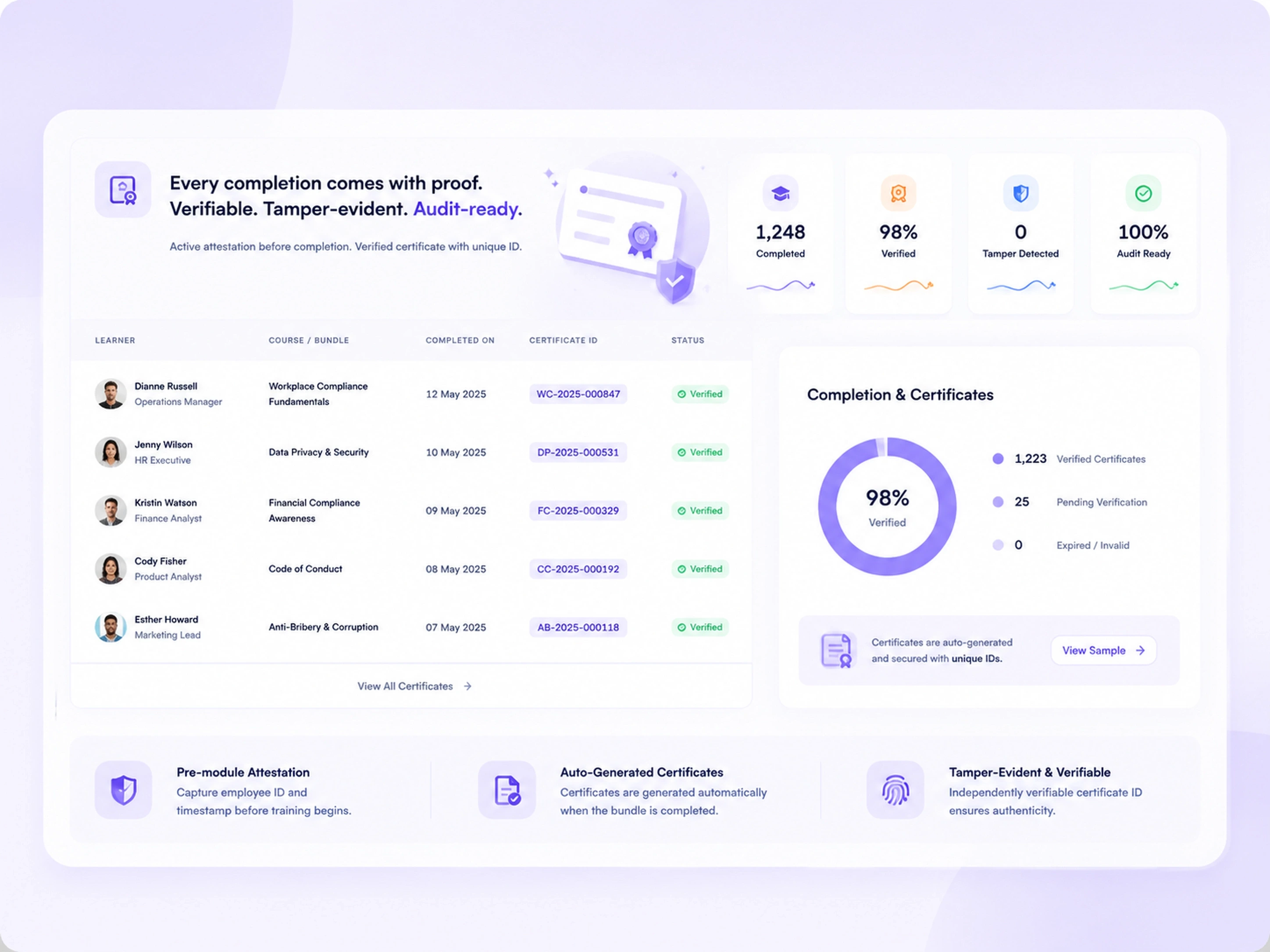
Completion certificates view listing learners, courses, completion dates and certificate IDs marked verified, beside a completion and certificates summary

Frequently asked questions

Is DocuStor included with every Trainery plan?

Yes. DocuStor is part of TraineryCORE, which is included with every TraineryHCM plan. There is no additional fee to use DocuStor for document storage and management.

Can DocuStor generate completion certificates automatically when a course is finished?

Yes. When a learner completes a course or learning path, Trainery generates a branded completion certificate automatically and stores it in DocuStor against the learner’s record. No manual certificate generation or filing is required.

Can external credentials uploaded by employees also be stored in DocuStor?

Yes. Employees and administrators can upload externally issued credentials, licenses, and certifications directly into DocuStor. These are stored alongside platform-generated records in the same searchable, permission-controlled repository.

How does DocuStor handle documents with expiry dates?

When a document is uploaded or created with an expiration date, DocuStor registers that date and triggers renewal alerts at configurable intervals, typically 90, 60, and 30 days before expiration. Alerts go to the employee, their manager, and designated compliance contacts so no renewal is missed.

Can we give auditors access to DocuStor without exposing the rest of the platform?

Yes. Trainery’s role-based access controls allow you to create a read-only auditor role that sees only the document records relevant to the audit scope. Auditors can search and retrieve records without accessing course content, learner profiles, or administrative settings.

Is there a storage limit on DocuStor?

Storage allocations are set by plan tier and scale with your subscription. Enterprise clients can discuss custom storage requirements with our team during implementation. Contact us for specifics relevant to your document volume.

Can DocuStor be used for HR documents beyond training records, such as employment contracts or offer letters?

Yes. DocuStor supports any document type tied to an employee record in TraineryCORE, including offer letters, employment contracts, policy acknowledgments, and performance-related documents.

Ready to transform your training infrastructure?

Whether you need digital course delivery at scale or structured ILT operations, our team will help you find the right fit for your organization.